Free Unlimited File hosting & Video Hosting on siasky.net

Free Unlimited File hosting & Video Hosting on siasky.net


This website https://siasky.net/ is verified on GitHub (Means it trustedhttps://github.com/SkynetLabs. So there is no hesitation on writing article about it. It provides free file hosting .


Decentralized Internet
for a Free Future


Some More Tips :-

Upload Multiple Files

Deploy your HTML Website Here or Upload your folder


Dashboard Feature - Detailed Analytics 


100gb Space in Free Account - Make it Unlimited by Using Many Emails - Many Accounts (Using temporary emails create different accounts and get infinite/unlimited web space with unlimited bandwidth)

Uploading Page of https://siasky.net/

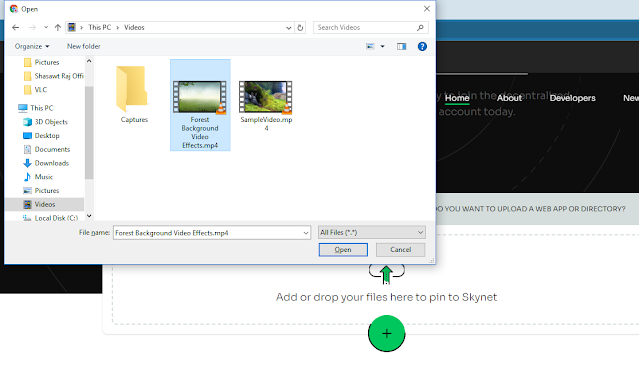
Select and Upload Your File/Video/Zip Here
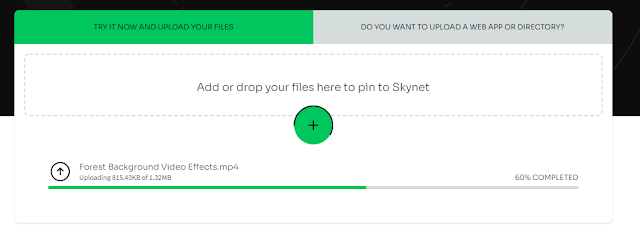


  • Now you will get a direct link of your file.

Here copy the direct link of your video(here) or the file


See the link result

Comments

Popular posts from this blog

Top Free APIs Every Developer Should Know About

Top Free APIs Every Developer Should Know About In the world of software development, APIs (Application Programming Interfaces) are essential for integrating various functionalities into applications. Here’s a curated list of top free APIs categorized by their functionality: 1. Weather APIs OpenWeatherMap API : Provides current weather data, forecasts, and historical weather data for any location. Weatherstack API : Offers real-time weather information, including forecasts and historical data. 2. Maps and Geolocation APIs Google Maps API : Enables integration of interactive maps, geocoding, and route optimization. Mapbox API : Provides customizable maps, navigation, and location search capabilities. 3. Finance and Stock Market APIs Alpha Vantage API : Offers real-time and historical equity and cryptocurrency data. Yahoo Finance API : Provides access to financial news, stock market data, and por...

Git Conflict Guide 🚀

What is a Git Conflict? A Git conflict occurs when two branches have changed the same part of a file, and Git cannot automatically merge the changes. When you attempt to merge or rebase branches, Git will pause the process and mark the conflicted files. Steps to Resolve a Git Conflict 1. Identify Conflicted Files When you encounter a conflict, Git will mark the conflicted files. You can see these files by running: git status Enter fullscreen mode Exit fullscreen mode 2. Open the Conflicted File Open the conflicted file(s) in your code editor. You'll see Git's conflict markers: <<<<<<< HEAD Your changes ======= Incoming changes >>>>>>> branch-name Enter fullscreen mode Exit fullscreen mode <<<<<<< HEAD marks the beginning of your changes. ======= separates your changes...

Random Posts